![logo-1.png]](https://support.propnow.com/hs-fs/hubfs/logo-1.png?height=40&name=logo-1.png)
- Before publishing the property:
The asking price is important when it comes to advertising to potential buyers. It should be attractive and appealing; most estate agents start with a discount of 22-35% on the determined market value. If the property has already been on the market, it is better to use the higher percentage or even start advertising at a higher price. This asking price is then listed as the sale price on the portals and later becomes the starting price in the bidding process. It is important to choose a value for your region that will attract good demand. If you have any questions about this, we will be happy to advise you! - The bidding process can be mentioned in the property description, but this is not mandatory (no legal requirement known). However, most estate agents include a two-line reference to this at the beginning or end of the text and draw the attention of interested parties to it directly. If required, you can request text modules from PropNow that you can use or adapt.
- If the property has already been published, you use a CRM system and now want to go public with the property at a new, more attractive price. You should duplicate the property so that it gets a new identification number on the portals with the aim of not showing the previous price history in the exposé.
- Plan the timeline in advance and take public holidays and school holidays into account so that the end of the bidding process does not fall at a time when many potential buyers from your catchment area are unavailable.
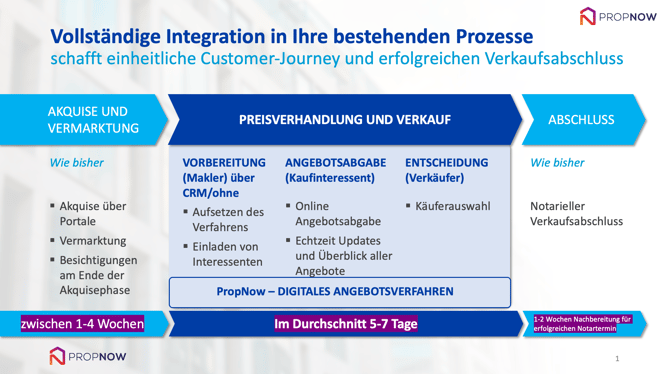
- The timeline can of course vary and could look something like this:
Note on viewings:
It is best if the viewings are very close together and take place shortly before the start of the time window in which interested parties can submit their offers. The viewings can be organised as open houses or as a series of viewings, for example, to show potential buyers that there is a lot of interest. By starting with an attractive price, you are in the driver's seat and can set time limits for the viewing appointments.
during market phase:
- After publication, wait to see how demand develops and then, after a few days on the portals, decide when to hold the viewings. These usually take place 2.5-4 weeks after publication of the exposé.
- Interested parties will send you their enquiries as usual via the portals or similar, and you will assist them as usual and then invite them to the viewing appointment you have set.
- We have provided you with marketing materials for the viewing appointment, which you can distribute to interested parties. It is important that you, as the estate agent, explain the timeline again and also the approximate course of the bidding process, i.e.:
Invitation by email/text message on..., You, as an interested party, then have until (date and time) to place your bid – during this time, you can see what and how much others are bidding (anonymously, of course) – Then you confirm the bid via SMS TAN procedure and it is also important to be there at the end of the process, because extensions may result from further bids and you may still be able to bid there in order to position yourself optimally vis-à-vis the seller. Each new bid is also confirmed by the interested party via SMS TAN.
Note on financing confirmations:
Most estate agents invite interested parties even if they do not have a financing confirmation in order to make the process more dynamic and receive more offers. Of course, as an estate agent, you should decide whether you want to do the same. For most estate agents, however, a few questions to prospective buyers are sufficient to provisionally assess their financial strength and then invite them to participate in the bidding process.
During the bidding process:
- The bidding process runs automatically from the moment you invite prospective buyers: i.e. extensions at the end of the period, sending the SMS TAN, etc.
Note on SMS TAN confirmation:
- If the customer has entered an incorrect mobile number, they can still change it when they submit their first bid.
- If SMS delivery is not possible, our system will automatically call the interested party and a computer voice will read out the TAN to them.
Reminders to interested parties about the end of the process:
The invited interested parties receive a notification 72 and 24 hours as well as 60 minutes before the end of the process, informing them when the bidding process ends and reminding them to place their bid.
Inviting sellers:
If you have invited the seller using the ‘Invite seller’ function, they can track price developments via an anonymous dashboard. Instructions on how to do this can be found at the following link: Click here!
You should also inform the seller that most bids are submitted at the end of the bidding period, or invite them at the end of the bidding process. The dashboard is updated automatically. Please note that the seller will not be notified of new bids by text message or email.
Please feel free to visit our other help articles for more information.
If you have any further questions, we will be happy to assist you (contact form) and wish you continued success with PropNow's digital bidding process!